
Wormにrが2個追加されちゃったのがゲーム名になっています。
プレイヤーが標的の中に居続けると得点が加算されるという、シンプルだけどついついハマってしまうゲームです。
よろしくお願いいたします。m(_ _)m
プレイ動画を作ってみましたが、なんかホームムービーチックになってしまった。(汗)
- (void)reset;
- (void)touchesBegan:(NSSet *)touches withEvent:(UIEvent *)event;
- (void)touchesMoved:(NSSet *)touches withEvent:(UIEvent *)event;
- (void)touchesEnded:(NSSet *)touches withEvent:(UIEvent *)event;
- (void)touchesCancelled:(NSSet *)touches withEvent:(UIEvent *)event;
reset 以外は、UIResponder のタッチメイベントそのままなので、馴染み深いでしょう。

@interface FlagGesture : UIGestureRecognizer
{
 unsigned int actMode;  // ジェスチャー管理用ワーク
 CGPoint startPoint;      // ジェスチャー開始座標
 CGPoint topPoint;        // 三角旗の天井座標
}
touchesBegan:メソッドは以下のようになります。
- (void)touchesBegan:(NSSet *)touches withEvent:(UIEvent *)event
{
 [super touchesBegan:touches withEvent:event];
 if ([touches count]!=1) {
   // マルチタッチを感知したら失敗とする
  self.state = UIGestureRecognizerStateFailed;
  return;
 }
 // ジェスチャー開始座標格納
 startPoint = [[touches anyObject] locationInView:self.view];
}
- (void)touchesMoved:(NSSet *)touches withEvent:(UIEvent *)event
{
 [super touchesMoved:touches withEvent:event];

 CGPoint nowPoint = [[touches anyObject] locationInView:self.view];
 CGPoint prevPoint = [[touches anyObject] previousLocationInView:self.view];

 switch (actMode) {
  case 0:  // 旗の天井に向かうアクション
   if (nowPoint.y<prevPoint.y) {
    float rot = atanf(fabsf(nowPoint.x-startPoint.x)/(startPoint.y-nowPoint.y));
    if (rot>=15) {
     // 15°以上傾いたら失敗
     self.state = UIGestureRecognizerStateFailed;
     return;
    }
   } else {
    if (nowPoint.x>prevPoint.x) {
     CGRect rect = self.view.bounds;
     // 垂直線が画面の高さの3分の1あるかを判定材料とする
     if ((startPoint.y-nowPoint.y)>=(rect.size.height*0.33f)) {
      // 旗の右端突端に向かうジェスチャーになったと仮定する
      actMode = 1;
      topPoint = nowPoint; // 旗の天井座標格納
      break;
     }
    }
    self.state = UIGestureRecognizerStateFailed;
   }
   break;

  case 1:  // 旗の右端突起に向かうアクション
   if ((nowPoint.x>=prevPoint.x)&&(nowPoint.y>=prevPoint.y)) {
    // OK
   } else if ((nowPoint.x<prevPoint.x)&&(nowPoint.y>=prevPoint.y)) {
    float dy = startPoint.y-topPoint.y;
    if (((topPoint.y+dy*0.35f)>nowPoint.y)||((startPoint.y-dy*0.35f)<nowPoint.y)) {
     // 突端のY座標が旗の垂直線の中央にないと失敗とする
     self.state = UIGestureRecognizerStateFailed;
     return;
    }
    actMode = 2;
   }
   break;

  case 2:  // 開始座標に戻るアクション
   if ((nowPoint.x<=prevPoint.x)&&(nowPoint.y>=prevPoint.y)) {
    // OK
   } else {
    self.state = UIGestureRecognizerStateFailed;
   }
   break;
 }
}
- (void)touchesEnded:(NSSet *)touches withEvent:(UIEvent *)event
{
 [super touchesEnded:touches withEvent:event];

 if ((self.state == UIGestureRecognizerStatePossible)&&(actMode==2)) {
  CGPoint nowPoint = [[touches anyObject] locationInView:self.view];
  CGPoint delta = CGPointMake(nowPoint.x-startPoint.x,nowPoint.y-startPoint.y);
  float k = delta.x*delta.x + delta.y*delta.y;
  if (k<(50*50)) {
   self.state = UIGestureRecognizerStateRecognized;
  }
 }
}
- (void)touchesCancelled:(NSSet *)touches withEvent:(UIEvent *)event
{
 [super touchesCancelled:touches withEvent:event];
 self.state = UIGestureRecognizerStateFailed;
}
- (void)reset
{
 [super reset];
 actMode = 0;
}
- (void)viewDidLoad
{
 [super viewDidLoad];
 FlagGesture *gesture = [[[FlagGesture alloc] initWithTarget:self action:@selector(handleGestureFlag:)] autorelease];
 [self.view addGestureRecognizer:gesture];
}

- (void)viewDidUnload
{
 [super viewDidUnload];
 NSEnumerator *e = [self.view.gestureRecognizers objectEnumerator];

 while (UIGestureRecognizer *gesture = (UIGestureRecognizer*)[e nextObject]) {
  [self.view removeGestureRecognizer:gesture];
 }
}

- (void)handleGestureFlag:(UIGestureRecognizer*)sender
{
 NSLog(@"FlagGesture OK! : state = %d",sender.state);
}
// 一番最初のアニメーション開始場所
- (void)startAnimation
{
  someView.frame = CGRectMake(0,-40,480,40);

  CGContextRef ctx = UIGraphicsGetCurrentContext();
  [UIView beginAnimations:nil context:ctx];
  [UIView setAnimationCurve:UIViewAnimationCurveEaseInOut];
  [UIView setAnimationDuration:0.5];
  [UIView setAnimationDelegate:self];
  [UIView setAnimationDidStopSelector:@selector(endAnimation1)]; // 次のアニメーション開始メソッド

  someView.frame = CGRectMake(0,0,480,40);

  [UIView commitAnimations];
}

// 前のアニメーションの終わりに呼ばれるメソッド
// ここが次のアニメーションの開始場所
- (void)endAnimation1
{
  CGContextRef ctx = UIGraphicsGetCurrentContext();
  [UIView beginAnimations:nil context:ctx];
  [UIView setAnimationCurve:UIViewAnimationCurveEaseInOut];
  [UIView setAnimationDuration:3.0];
  [UIView setAnimationDelegate:self];
  [UIView setAnimationDidStopSelector:@selector(endAnimation2)];

  someView.frame = CGRectMake(0,1,480,40);

  [UIView commitAnimations];
}
// ・・・以下続く
+ (void)animateWithDuration:(NSTimeInterval)duration animations:(void (^)(void))animations completion:(void (^)(BOOL finished))completionanimations: の後にアニメーション処理をブロックで、completion: の後にアニメーション後の処理をブロックで指定します。
UIView *someView = ビューをインスタンス化してローカル変数に退避;
someView.frame = CGRectMake(0,-40,480,40);

[self.view addSubview:someView];

[UIView animateWithDuration:0.5
     animations:^{someView.frame = CGRectMake(0,0,480,40);}
     completion:^(BOOL finished) {
[UIView animateWithDuration:3.0
     animations:^{someView.frame = CGRectMake(0,1,480,40);}
     completion:^(BOOL finished) {
[UIView animateWithDuration:0.5
     animations:^{someView.frame = CGRectMake(0,-40,480,40);}
     completion:^(BOOL finished) {
[someView removeFromSuperview];
}];  }];  }];
ずいぶん見通しが良くなりました。 


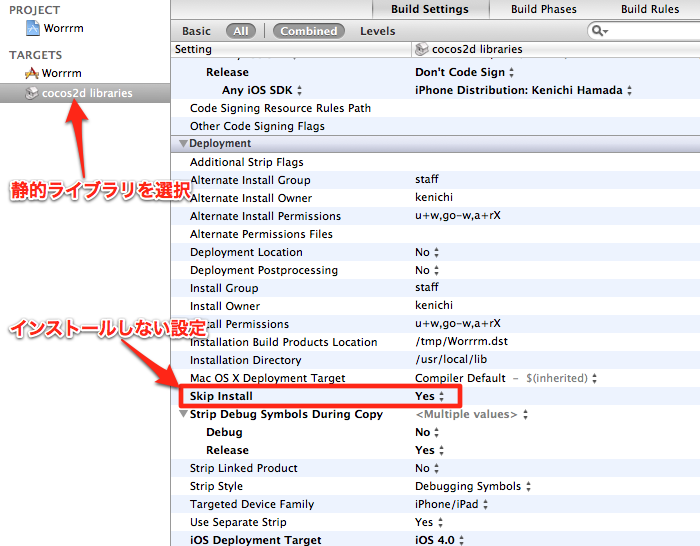

dyld: Symbol not found: __NSConcreteStackBlock
  Referenced from: 〜省略〜
  Expected in: /usr/lib/libSystem.B.dylib
NSConcreteStackBlock ってなんですか?
ブロックオブジェクトは、C言語レベルの構文によるランタイム機能です。標準Cの関数に似ていま すが、実行可能なコードのほかに、自動(スタック)メモリまたはマネージド(ヒープ)メモリに バインドされている変数を含むことができます。したがって、ブロックでは、実行時の動作に影響 を与える状態(データ)セットを維持できます。Blocks は iOS 4 から導入されました。


 | |
| エディター画面 |


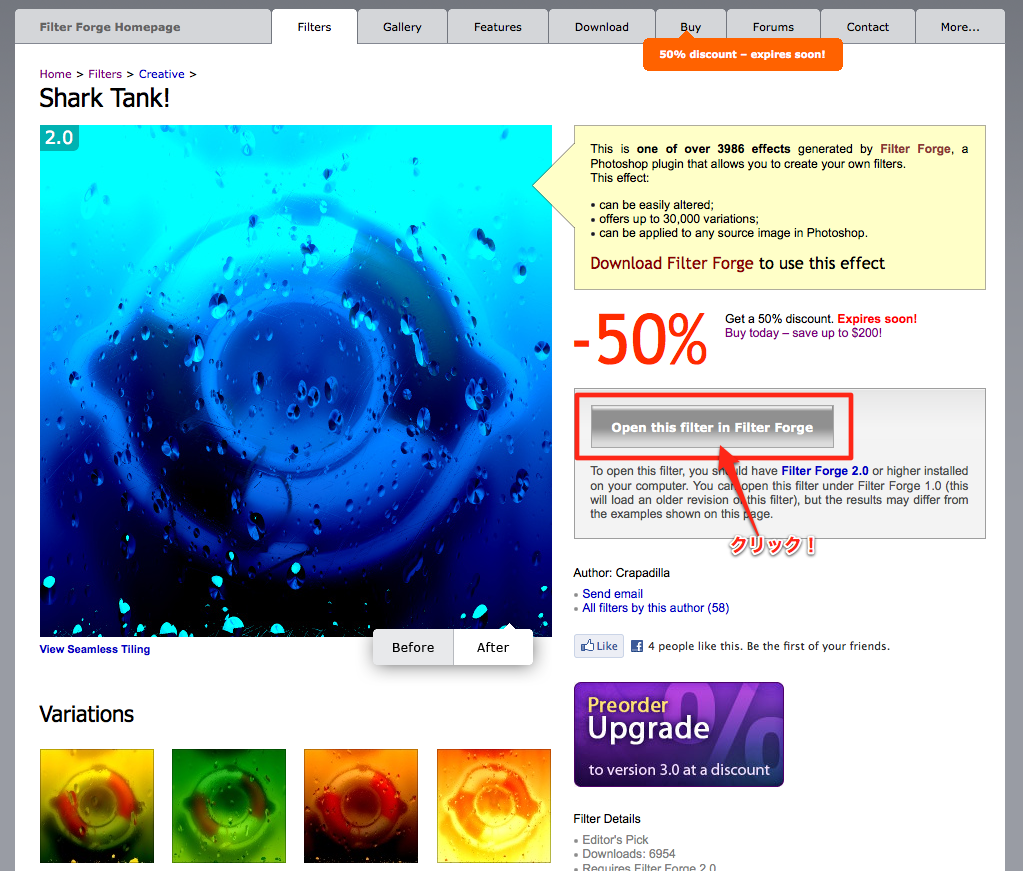 | |
| Filtersのページ |


